 Decibel Sound Meter
How to measure decibels on your iPhone
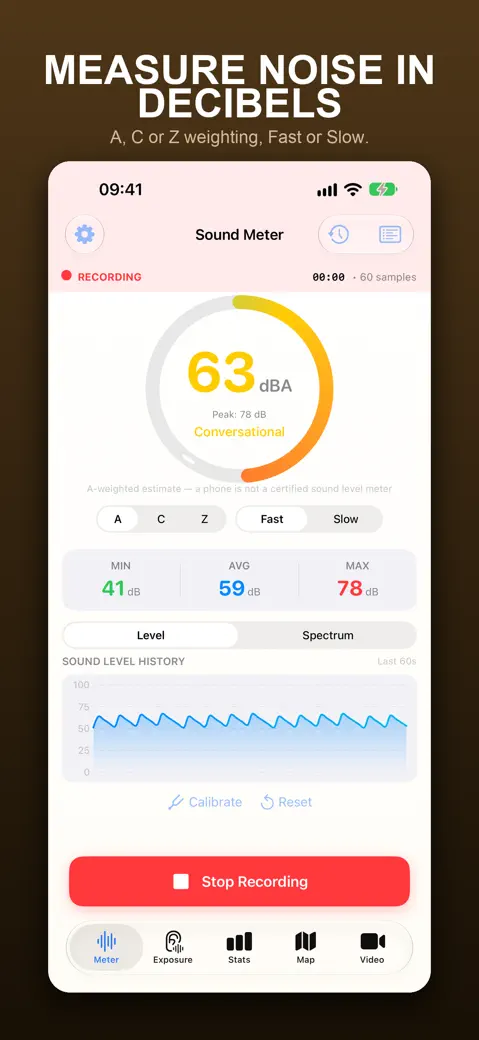
Open Decibel Sound Meter, allow the microphone and read the live number on the Meter tab. For a figure you can rely on more than a single instant, tap Start Recording for 30 to 60 seconds and read AVG, the energy average of that period.

 Android: Decibel Meter: Sound Level dB
Online noise level meter
- Level (0-100)
- —
- Peak
- —
- Status
- —
The browser didn't get the microphone. Allow it in the address bar (Safari: aA > Website Settings > Microphone) and try again.
- Distance between bends
- Shrink
- Multiplier
Enter numbers of zero or more; the set or the roll must be above zero.
Showing the worked example. Turn on JavaScript to calculate your own numbers.
A relative level from your device's microphone, not calibrated dB(A): every phone, laptop mic and browser reads differently. Use it to compare louder and quieter, or as a classroom noise light on a laptop. Audio stays on your device; nothing is recorded or sent. For real decibel readings, LAeq and a saved log, use the app.
Can I measure decibels with my iPhone?
Yes. The iPhone's microphone hears the sound around you just fine for everyday use — a blender, a crowded bar, a neighbour's generator. A sound meter app turns that signal into decibels. Decibel Sound Meter applies the A-weighting curve described in IEC 61672, which shapes the reading to how human ears hear, and a Fast (125 ms) response, so the number follows the sound without jittering on every sample.
Phone microphones read low, so out of the box the app adds a starting offset: +10 dB on iPhone and +8 dB on iPad. Treat the result as a good estimate, not a certified reading — it won't catch a sudden bang accurately, and it drifts a little between phone models. If you need it closer to a reference meter, calibrate it once (there is a separate guide for that).
How to check decibels on iPhone, step by step
- Open the app. On the Meter tab, titled Sound Meter, allow microphone access when asked. The reading starts on its own.
- Hold the phone still at the spot you want to measure, microphone uncovered, and keep your hands and voice away from it.
- Read the big number (the current level), the peak shown under it and the word that describes the level, such as Quiet or Loud.
- For a stable figure, tap Start Recording. MIN, AVG and MAX start filling in and the SOUND LEVEL HISTORY chart shows the Last 60s.
- After 30 to 60 seconds, tap Stop Recording and choose Stop & Save. Recordings of 10 seconds or less are saved without asking.
- The Export Report sheet opens; close it if you don't need a report now. Tap the clock button to open History, then tap the session for Measurement Details, where you can add Notes and Tags.
What do the numbers on the meter mean?
| On screen | What it tells you |
|---|---|
| Big number | The current A-weighted level in whole decibels, updated continuously |
| Peak | The highest recent level, held for 2 seconds so you can read it |
| MIN | The quietest moment of the recording |
| AVG | The energy average (LAeq) of the recording, not a simple mean |
| MAX | The loudest moment of the recording |
Why an energy average? Decibels are logarithmic, so loud moments carry far more energy than quiet ones. Thirty minutes at 70 dB followed by thirty minutes at 90 dB average to 87.0 dB, not 80 dB. That matches what reaches your ears.
How to measure decibels in a room or at home
A single glance tells you little, because a room changes second by second. Record instead, and compare like with like: same spot, same time of day, same distance from the source.
| What you want to know | How to measure it | What to read |
|---|---|---|
| How quiet is my bedroom at night? | Record 60 seconds from the pillow, with doors and windows as they are when you sleep | AVG and MAX |
| How loud is the white noise machine at the crib? | Put the phone where the baby's head lies, machine at its usual volume, record 60 seconds | AVG |
| Is the TV too loud? | Record from your seat during normal viewing | AVG, then compare with Normal Conversation in Noise Levels |
| Which room is quietest for working? | Record 60 seconds in each room at the same time of day | Compare the sessions in History |
See the noise by frequency: octave bands
Switch the chart under the big number from Level to Spectrum and the level history gives way to ten bars, one per octave band from 31.5 Hz to 16 kHz. Each bar is how loud the sound is inside that band, so you can tell a low rumble from a high whine instead of only knowing how loud it is.
| Band | What usually lives there |
|---|---|
| 31.5 Hz | Deep rumble from heavy lorries, trains and big machines. Phone microphones are weak down here, so trust this bar least. |
| 63 and 125 Hz | Bass from music through a wall, the hum of a boiler or compressor, an idling engine. |
| 250 and 500 Hz | The body of voices, TV sound, most of a busy room. |
| 1 and 2 kHz | Speech consonants, ringtones, beeping alarms. |
| 4, 8 and 16 kHz | Hiss, squeals, brakes, chirps, electronic whine. |
The Peak label at the top right of the chart, shown as Peak followed by a frequency such as 125 Hz, names the strongest frequency at that moment, and the tallest bar prints its level in dB. This Peak is a frequency, not the held dB value on the Meter screen, and it is only as fine as one step of the analysis, so read it as "around 125 Hz". Spectrum is free.
The bars are not A-weighted, so a bass bar can read higher than the big number, which plays bass down. It is an octave-band view for telling noises apart on a phone microphone, not a certified analyser, and it is live only: nothing from it is saved to History or reports.
Tips for a reading you can trust
- Record at least 30 to 60 seconds; one instant can be a door slam or a cough.
- Stay quiet while measuring. Your own voice is the loudest thing near the microphone.
- Take the phone out of your pocket, and don't let a thick case or your fingers cover the microphone.
- If the display shows
--, the meter is stopped or a phone call has taken the microphone; it resumes on its own. - Open Noise Levels with the list button to compare your number with everyday sounds, from a Quiet Library at 40 dB to a Subway Train at 100 dB.
- Calibrate if you need the absolute number rather than comparisons between places.
Sources & method
Figures and facts on this page come from the references above and from testing in our own apps. How we write and check guides
Questions and answers
Can I measure decibels on my iPad?
How do I measure decibels on iPhone for free?
How long should I record?
Why is AVG higher than the level I saw most of the time?
You might also like
- How accurate is an iPhone decibel meter, and how do you calibrate it? · Decibel Sound Meter
- How many decibels is too loud? A decibel levels chart with real examples · Decibel Sound Meter
- What is LAeq in noise measurement? The average noise level, with real numbers · Decibel Sound Meter
More Decibel Sound Meter guides
- How accurate is an iPhone decibel meter, and how do you calibrate it?
- Noise dose calculator: your NIOSH and OSHA daily exposure, on your phone
- How to record and measure noise from neighbours for a complaint
- Noise alert app: get warned when it gets too loud
- What is LAeq in noise measurement? The average noise level, with real numbers
- How loud is snoring? Measure a night's sleep in decibels
- Does iPhone have a decibel meter? Not one for the room you're in
- All questions about Decibel Sound Meter
- Back to Decibel Sound Meter